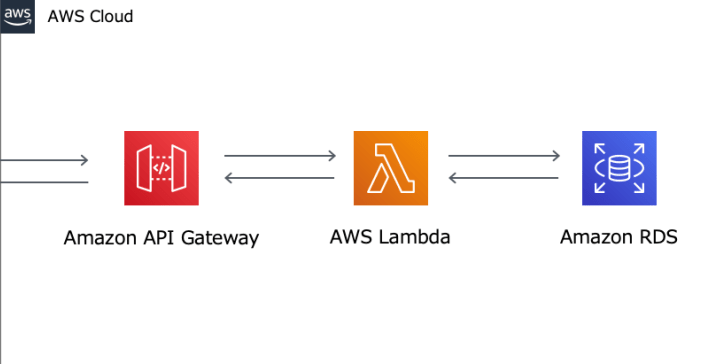
0. DB 생성
연동할 DB 생성하고 접속. 꼭 RDS 아니더라도 상관 없음~!
mysql -u admin -p -h 엔드포인트
use DB이름;
CREATE TABLE student (sname VARCHAR(10), sage INT);
             테이블명    속성

INSERT INTO student VALUES('pig',10);
       데이터 몇 개 넣어둠!

select * from student;
       데이터 확인
1. Lambda 함수 생성
pymysql.ZIP 파일을 다운받아 업로드한다.
바이러스 아님.. ㅜㅜ🐬
찾아서 받기 귀찮으신 분들 위에거 다운받으세용
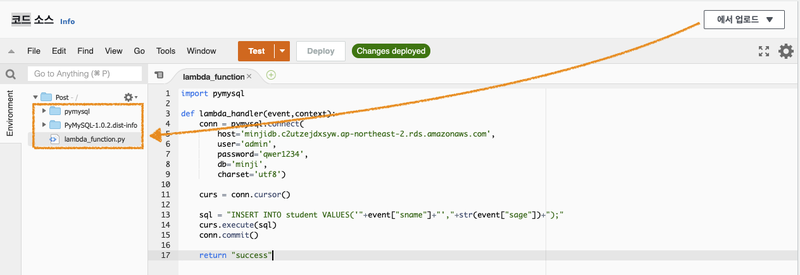
코드는 다음과 같다.
import pymysql

def lambda_handler(event,context):
    conn = pymysql.connect(
        host='RDS 엔드포인트',
        user='admin',
        password='비번',
        db='DB이름',
        charset='utf8')

    curs = conn.cursor()

    sql = "INSERT INTO student VALUES('"+event["sname"]+"',"+str(event["sage"])+");"
    curs.execute(sql)
    conn.commit()
return "success"
2. HTML 코드
<!DOCTYPE html>
<html lang="ko">
<head>
<meta charset="UTF-8">
<title>POST-Ajax Request</title>
<script>
function sendRequest() {
var httpRequest = new XMLHttpRequest();
      httpRequest.onreadystatechange = function () {
if (httpRequest.readyState == XMLHttpRequest.DONE && httpRequest.status == 200) {
          document.getElementById("text").innerHTML = httpRequest.responseText;
}
};
var sname = document.getElementById('sname').value;
var sage = document.getElementById('sage').value;
      console.log(sname)

      httpRequest.open("POST", "https://z1uxkevndb.execute-api.ap-northeast-2.amazonaws.com/select_stage/insert", true);
      httpRequest.setRequestHeader("Content-Type", "application/json");
      httpRequest.send("{\"sname\":\""+sname+"\", \"sage\":"+sage+"}");
}
</script>
</head>
<body>
<h1>POST 방식의 요청</h1>
이름 : <input id="sname" type="text"/> <br/>
나 : <input id="sage" type="text"/> <br/>
<button type="button" onclick="sendRequest()">POST 방식으로 요청 보내기!</button>
<p id="text"></p>
</body>
</html>
✅ 결과
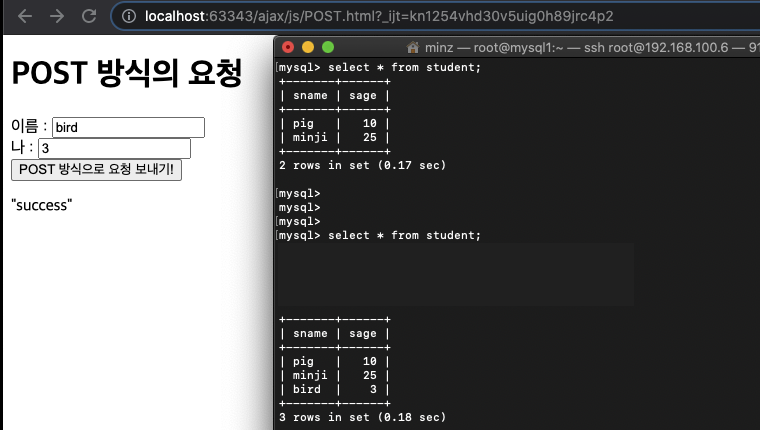
이름, 나(이)ㅠㅠ
웹페이지에서 데이터를 입력(insert)하면 연동된 RDS에 바로 적용이 된다.
📝
정적 컨텐츠는 S3에 올려놓고 쓸 수 있다.
'정적 웹 호스팅 되어있는' 버킷에 업로드.
문제는 사용자가 로그인되어 있다는 처리를 못한다.
람다는 서버리스인데,
세션(서버 컴퓨터에 저장. 쿠키는 클라이언트 컴퓨터에 저장)을 저장할 '서버'가 없기 때문에.
메모,,